WHAT WE EXPLORED
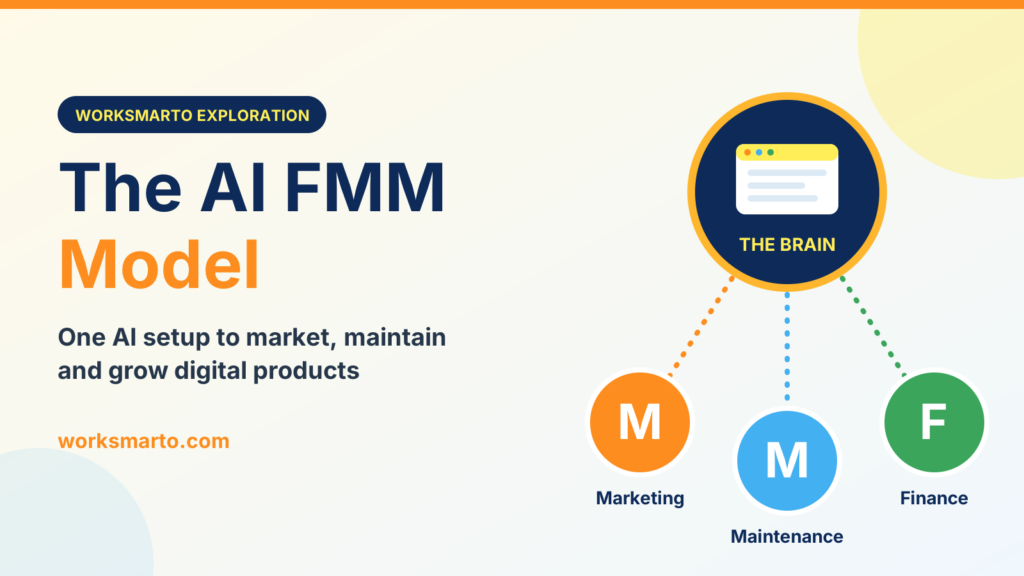
The Worksmarto AI FMM Model: a one-stop AI setup for marketing, maintenance and finance, tested on real digital products while keeping people in control.
Level: Beginner–intermediate Stack: Claude / ChatGPT · MCP · WordPress · GitHub · ElevenLabs · Make / n8n
I’m a solopreneur exploring digital products — websites, micro-SaaS ideas, apps, automation, AI agents — and sharing what I learn on WorkSmarto.com.
Sometimes it works.
Sometimes it breaks.
Either way, I learn something and share it.
This is my actual AI setup — marketing from one stop, maintenance from one stop, finance at the end.
THE 30-SECOND TAKE
- Use your website as a shared knowledge base, and connect one AI assistant to the tools you use for marketing and maintenance.
- Automate repetitive work and explore sensible ways to earn from your products.
- Review important actions yourself. This is an evolving experiment, not a promise that one chatbot can safely do everything.
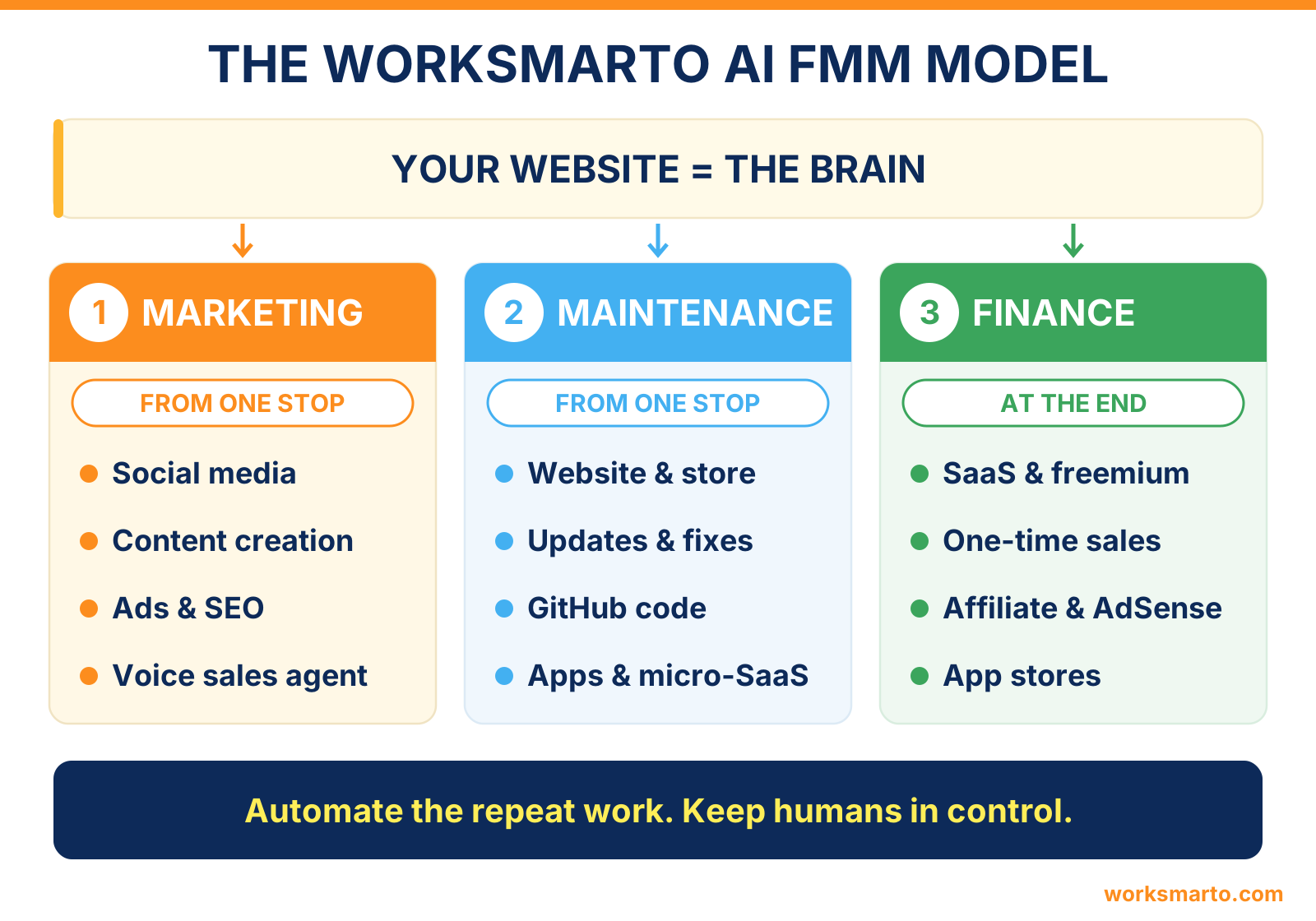
Read it your way: see the whole model in the picture below, then follow the four steps in order.
YOUR LEARNING PATH
1. Marketing From One Stop: Your AI Marketing Assistant
You can build the best product in the world. But if nobody sees it, does it even exist? So marketing came first.
Website for Visibility
Your website is your digital identity. For me, WorkSmarto.com is where I keep my knowledge, experiments, product ideas, and learnings.
One place. One brain. One source of truth.
Chatbot: Marketing From One Stop
Using ChatGPT or Claude with MCP connectors, I connect the tools behind my marketing: ads and analytics, social media, content and SEO, and the website and blog. The full stack is mapped in The One-Chat Marketing Department.
Then instead of opening five tabs, I ask:
One chat window. One assistant. Marketing from one stop.
Useful tools to explore: ChatGPT, Claude, Make.com and n8n.
AI Voice Sales Agent — ElevenLabs
I’m testing ElevenLabs voice agents as a sales-style assistant.
Visitor asks: “Can you build an AI chatbot for my website?”
↓
Voice agent explains the service
↓
Qualifies the lead and collects details
↓
Even when I’m not available
My ElevenLabs sales agent setup is ready and coming soon. I’m training it with the same bot knowledge used by the site chatbot, built in this Gemini chatbot guide.
Pure Digital Marketing
Marketing is not just ads. It’s ads, social media, on-page SEO, keywords, content and a voice agent, all from one stop.
For ads, AI helps with research, copy, and optimisation — but I still check targeting, budget, and conversions. For organic growth, I focus on my blog.
At WorkSmarto, I document what I actually test: MCP tools, AI agents, apps, micro-SaaS, websites, and automation.
Automation
I don’t want to post manually every day. So I’m testing automation with Make.com, n8n, GitHub cron jobs, and AI schedulers.
CREATE ONCE, DISTRIBUTE EVERYWHERE
One blog post → Social posts + Newsletters + Video scripts
I also tested AI auto-blogs for news at news.worksmarto.com — an experiment in automating content creation.
Coming soon: tutorials on AI avatars and auto video creation with Remotion + Claude — interesting tools I’m exploring next.
In short: one AI chat with MCP runs social media, content, ads and SEO from one place. You still check budget and targeting.
2. Maintenance From One Stop: Keep Digital Products Running
Marketing brings people in. But if your website, app, or store breaks, they leave. So maintenance and development came next.
A Small Chatbot That Operates Everything
This is the part that surprised me most.
Not a big team. Not ten dashboards. Not hours of manual work.
Just one small chatbot — Claude or ChatGPT — connected to the tools I actually use. Using MCP connectors, I connect it to the website and WordPress, the e-commerce store, the GitHub repository, ads and analytics, social media, and content and SEO. New to MCP? Start with What Is an MCP Server?
Then instead of opening five tabs, I ask:
One chat window. One assistant. Maintenance from one stop.
My Live Experiments
I’m testing this on real products:
Same knowledge base. Different products. One AI system.
Pick Your Path
E-commerce owner
Use: Hostinger + WordPress + MCP in ChatGPT
Ask: “Update this product page, check today’s orders, and prepare a promo post.”
Store maintenance becomes a chat, not a chore.
Simple website or micro-SaaS
Use: GitHub access + AI
For: updates, fixes, features and pull requests
You review. You approve. You stay in control.
Software products
Use: GitHub + Copilot + Codespaces + Claude Code
For: builds, terminals and deeper dev work (tested on an Expo CLI Android build for the Play Store)
One prompt. One workspace. Start building.
Useful tools: GitHub, GitHub Copilot, Codespaces and Claude Code.
Copy Our Experimental AI Setup
If you’re a developer or maintaining a similar product, you can copy this experimental AI setup:
Same structure. Different products. One AI system.
In short: connect the chatbot to your website, store and GitHub. It does the updates; you review and approve.
3. Finance: Ways Digital Products Can Earn
Everyone says “launch a SaaS.” But that’s not the only way to make money from digital products.
I’m still experimenting. But I don’t want to lock myself into one model too early.
The real lesson? Digital products are easy to copy. So the real edge is a real solution, a smooth experience, convenience that saves time, human touch, trust and a loyal audience.
AI helps me build faster. Value makes people stay.
In short: choose an earning model slowly. The lasting edge is a real solution, trust and a loyal audience.
4. Practical Tips From My Experiments
Security
Keep API keys in the backend, not frontend. Use Cloudflare Workers if no backend.
Privacy and trust
Be transparent about data collection. Take consent before collecting personal data. Give users a way to request deletion. Use reliable third-party services like Google Ads and Analytics. Review compliance regularly.
Ways of working
Use affordable freelancer help (like Truelancer) for specialised tasks. Try coworking spaces, libraries, or cafes for focus and energy.
Fast is good. Safe and trustworthy is better.
5. What’s Next: Multi-Agent Superintelligence
Multi-agent systems are coming. Superintelligent agents are coming. What we do now will be faster than before.
WorkSmarto is built for that future.
WorkSmarto verdict
Worth exploring when: one person is building or running several digital products and keeps switching between dashboards.
Start small: website as the brain → one AI chat with MCP → one marketing prompt → one maintenance prompt → review.
Do not skip: human review of code and ads, API key safety, consent and privacy, and choosing an earning model slowly.
Final Thought
I’m here to experiment, learn, and share. My current setup is simple:
Marketing from one stop. Maintenance from one stop. Finance in the end.
Make your website the brain. Connect AI to your tools. Automate the repeat work. Keep humans in control.