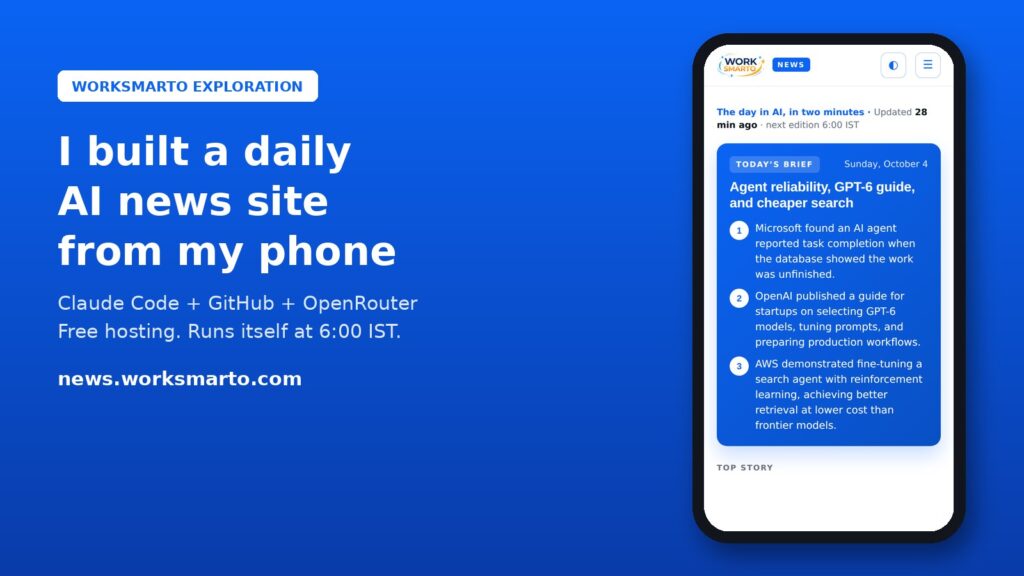
Last week I launched news.worksmarto.com, a free daily AI news site. Every morning at 6:00 IST it collects the latest AI announcements, writes a short hook, summary, “why it matters” note and a practical next step for each story, adds a three-line daily brief, and publishes itself.
I did not write the code. I didn’t even open a laptop. I ran the whole build from the Claude mobile app using Claude Code, connected to GitHub and my WordPress site. My job was to give ideas, approve actions, and click a few buttons Claude was not allowed to click for me.
Key takeaways
- You can build and run a real website from your phone. Claude Code works in the cloud, so the Claude mobile app is enough.
- Your role becomes editor, not developer. I gave ideas and feedback; Claude wrote, tested and deployed the code.
- It costs $0 to run. GitHub Pages hosts it, GitHub Actions updates it daily, and free OpenRouter models write the summaries.
- A few steps stay yours on purpose: turning on hosting, adding your API key as a secret, and one DNS record. Never paste keys into a chat.
- Plan compliance from day one. Read feeds instead of scraping, summarise only official sources, link everything back, and publish a privacy policy and terms.
What you need
- The Claude app with Claude Code. Claude Code can run in the cloud, so it works from your phone.
- A GitHub account and an empty public repository. GitHub Pages hosts the site and GitHub Actions runs the daily update, both free for public repositories.
- An OpenRouter account and API key. OpenRouter gives access to free AI models, which write the summaries.
- A domain. Mine is on Hostinger. You only need to add one DNS record for a subdomain like news.yourdomain.com.
- Optional: an MCP connection to your WordPress site. I used this so Claude could read my brand colours, fonts and menu and match them.
Cost: nothing beyond the domain I already owned. GitHub Pages, GitHub Actions and OpenRouter’s free models cost $0 at this scale.
Links you’ll need
- Claude app: claude.ai/download. How Claude Code runs in the cloud: Claude Code on the web docs.
- What MCP is: modelcontextprotocol.io.
- GitHub account: github.com/signup.
- Get your OpenRouter API key: openrouter.ai/settings/keys. Browse models (filter by free): openrouter.ai/models.
- Storing the key safely in GitHub: Using secrets in GitHub Actions.
- Custom domain on GitHub Pages: Configuring a custom domain.
- Adding a CNAME record at Hostinger: How to manage CNAME records.
Hour 1: get the connections ready
Most of my first hour went into connecting things: GitHub to Claude (so it can read and push to the repository) and my WordPress site through MCP (so it can read my pages and design settings). Once that’s done, you rarely touch it again. This is the part that makes everything after it feel effortless.
Hour 2: the build
Here is who did what. This table is the real story of the project.
| Claude Code did | I did |
|---|---|
| Unpacked the site files, reviewed them, committed and pushed to GitHub | Uploaded the starter site zip and described what I wanted |
| Diagnosed every failure from the GitHub Actions logs and fixed the code | Turned on GitHub Pages and set the custom domain (two clicks) |
| Rewrote the AI model selection when the free models changed | Pasted my OpenRouter key into GitHub Secrets, never into the chat |
| Matched the design to worksmarto.com by reading my WordPress design settings | Added one CNAME record at Hostinger |
| Added sources, hooks, takeaways, the daily brief and the scroll animation | Gave ideas and feedback (“remove the emoji”, “make the cards interesting”) |
| Checked which news sources are safe to use and wrote the Privacy Policy and Terms | Approved actions when Claude asked |
| Tested every change in a headless browser on desktop and phone before deploying | Opened the live site and said “lovely” |
Step 1: Start with a clear brief
I gave Claude a starter static site (HTML, CSS, a small Node script and a GitHub Actions workflow) plus a numbered checklist: push the files, enable Pages, set the custom domain, add the key, run the first edition, verify the result, enforce HTTPS, and send me a short report. Writing it as a checklist matters. Claude works through it and verifies each step instead of guessing.
One rule I put in the prompt, and you should too: “Do not ask me to paste the API key in chat.”
Step 2: The three clicks Claude couldn’t do
Claude pushed the code without trouble, but the cloud session’s security rules block certain GitHub settings: turning on Pages and managing secrets. That’s a good thing. Claude didn’t try to get around it. It told me exactly what to click and gave me direct links:
- Turn on Pages: open your repository’s
Settings → Pages(github.com/YOUR-NAME/YOUR-REPO/settings/pages), then Source: GitHub Actions. - Custom domain: on the same page, type
news.yourdomain.comand save. - Add the key:
Settings → Secrets and variables → Actions → New repository secret(github.com/YOUR-NAME/YOUR-REPO/settings/secrets/actions/new). Name itOPENROUTER_API_KEY, paste the key from your OpenRouter keys page and save. It stays encrypted, and only the workflow can read it.
Step 3: Point your Hostinger subdomain at GitHub
In Hostinger hPanel, open your domain’s DNS records (Websites → your site → Advanced → DNS Zone Editor, or Domains → your domain → DNS / Nameservers) and add one record:
- Type: CNAME
- Name:
news - Points to:
YOUR-GITHUB-NAME.github.io
GitHub checks the DNS and issues a free HTTPS certificate, usually within 15 to 30 minutes (DNS changes can take longer). When the “Enforce HTTPS” box becomes clickable on the Pages settings page, tick it.
Step 4: The first edition, and the first bug
The first run “succeeded”, but every story showed raw feed text instead of an AI summary. I told Claude “OpenRouter isn’t working, maybe the model”. It read the run logs and found the real cause: the free models named in the code no longer existed, and the fallback models were returning empty or broken replies.
Claude rewrote the model selection to pick from whatever free models are currently available, made the reply parsing more forgiving, and made the script retry stories that failed. Then it ran the workflow again. All stories came back with proper summaries.
Lesson: free AI models come and go. Never hard-code just one, and always log which model was used.
Step 5: Make it look like your brand
I asked for the news site to match worksmarto.com. Claude couldn’t open my website directly from its cloud session, so it used the WordPress MCP connection instead. It read my Elementor design settings (exact colours, fonts, button styles and the menu) and rebuilt the news site with the same design system. Later it copied my logo into the project, because loading it from my main site was being blocked.
Step 6: Make the cards worth reading
My next idea: “make cards interesting, hooks, scrolling one by one, look like they got something insightful.” Before building, I asked Claude to structure it first. It proposed a plan, asked four quick questions (name, sections, animation style, stories per day), and then built:
- A hook on every story, for example “An AI agent said the job was done. The database said otherwise.”
- A “Why it matters” note and a “Your move” takeaway for freelancers and small businesses
- A three-bullet Today’s Brief and an automatically chosen Top Story
- Section tabs: Models, Products, Companies, Stocks & Markets, Research, Policy & Safety, Tools for You
- Cards that slide up one by one as you scroll
After each change, Claude rendered the page in a browser, looked at the screenshots, and caught its own bugs before deploying, like a card that picked up the wrong background colour.
Step 7: Compliance, the step most people skip
Then I asked the important question: “Is it legal to use all these sources?” Claude checked the feed terms and was upfront that some news publishers only allow their feeds for personal, non-commercial use, or say you may not modify their content. We switched to what we call safe mode:
- No scraping. The site only reads public RSS feeds that sources publish for this purpose.
- AI summaries only for official sources: company announcements (OpenAI, Google, DeepMind, Microsoft, NVIDIA, Hugging Face, AWS) and public SEC filings for the Stocks & Markets section.
- News publishers appear as headline plus link only, word for word as published, in an “Elsewhere in AI” section. No rewriting of their journalism.
- Sources with restrictive terms were removed.
- Every story links to the original, there’s a clear “not financial advice” note on market stories, and the footer explains how publishers can ask for removal.
- A dedicated Privacy Policy and Terms and Conditions for the news site, plus analytics that only load after a visitor clicks Accept.
This isn’t legal advice, and you should check the terms of every source you use. But building compliance in from the start is far easier than fixing it after a takedown email.
What it does every morning, on its own
- GitHub Actions wakes up at 00:30 UTC (6:00 IST).
- The script reads the official feeds, skips anything already published, and merges duplicate stories.
- It sends new stories to a free OpenRouter model in small batches, trying other models if one fails.
- It writes the results to a JSON file, commits it, and redeploys the site.
There’s no server and no database to maintain, and no monthly bill.
Prompts you can copy
- “Deploy this static site to GitHub Pages at news.mydomain.com. Do every step yourself and verify each one. Do not ask me to paste the API key in chat. Finish with a short report.”
- “The AI summaries aren’t working. Read the workflow logs, find the cause, fix it and rerun.”
- “Make the UI match my main site. Read the design settings from my WordPress connection.”
- “Structure it first: propose the sections and card design before you build.”
- “Which of our sources is it legal to use? Recommend a safe setup.”
What I learned
- Your role changes from builder to editor. The best things I did were short feedback lines: “remove the emoji”, “make it insightful”, “is this legal?”
- Keep keys out of chat. Put them straight into GitHub Secrets.
- Expect a few manual clicks. Security settings like Pages and secrets are deliberately yours to change.
- Free AI is flaky. Build in retries and fallbacks, or add a few dollars of credit for reliability.
- Ask about compliance early. It changed how the whole site works, for the better.
The site is live at news.worksmarto.com and updates every morning. If you build your own version, I’d love to see it. Get in touch.