WHAT WE EXPLORED
A free AI workflow generator built as a micro-SaaS, and what it actually produces.
THE 30-SECOND TAKE
- architect.worksmarto.com turns any goal into a step-by-step, downloadable plan.
- Five free plans without an account, unlimited free with one.
- It runs on the Groq API and suggests both AI and automation tools for each plan.
There’s a tool that turns any goal into a working plan: which AI tools to use, which automation tools to wire them together with, in what order. It’s called architect.worksmarto.com, it’s free, and here’s exactly how it works.
How It Works
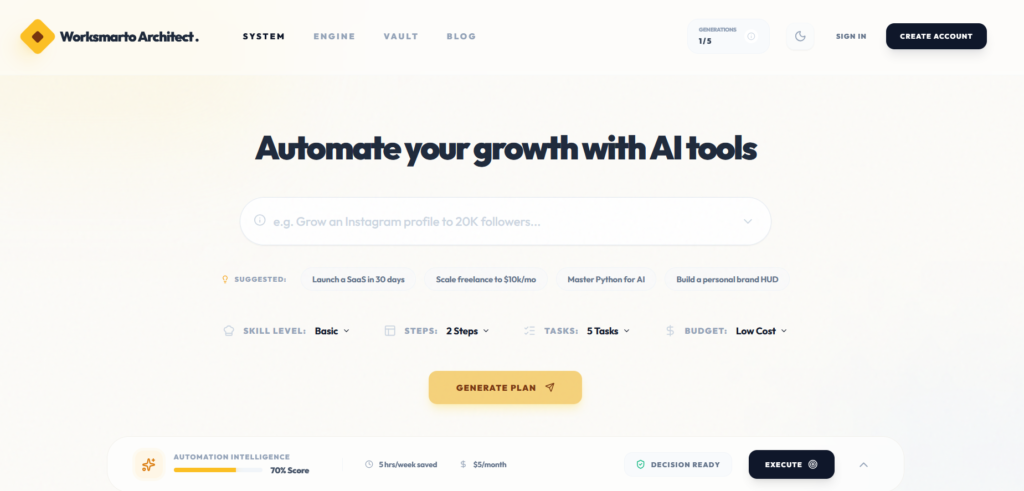
Type in a goal — “Grow an Instagram profile to 20K followers,” “Launch a SaaS in 30 days,” “Scale freelance to $10k/mo,” or your own. Set four dials: Skill Level, Steps, Tasks, Budget. Hit Generate Plan. It maps out the exact AI tools and automation tools for the job — not generic advice, a real sequence you can follow or deploy.
Features
- Customizable generation — set how many steps, how many tasks, your difficulty level, and the tool pricing tier (free, low-cost, or premium).
- Instant plan — hit Generate and get a real, structured workflow back, not generic advice.
- Don’t love it? Tune it. — adjust the parameters and regenerate until it actually fits how you work. Nothing’s locked in.
- Download and use it anywhere — your office, your team, your own workflow.
Try It Free — No Account Needed
5 free plans, no account required. Create a free account and it’s fully free, unlimited. Try prompts like “Instagram” or “Facebook” — you’ll get back a genuinely useful, popular workflow built around that exact goal. Like what you built? Download it.
The Result: A Real Instagram Growth Plan
Here’s what came back when we typed in an Instagram growth goal — two steps, five columns: Strategy, Analysis & Protocol, Intelligence, Pipeline, Deployment.
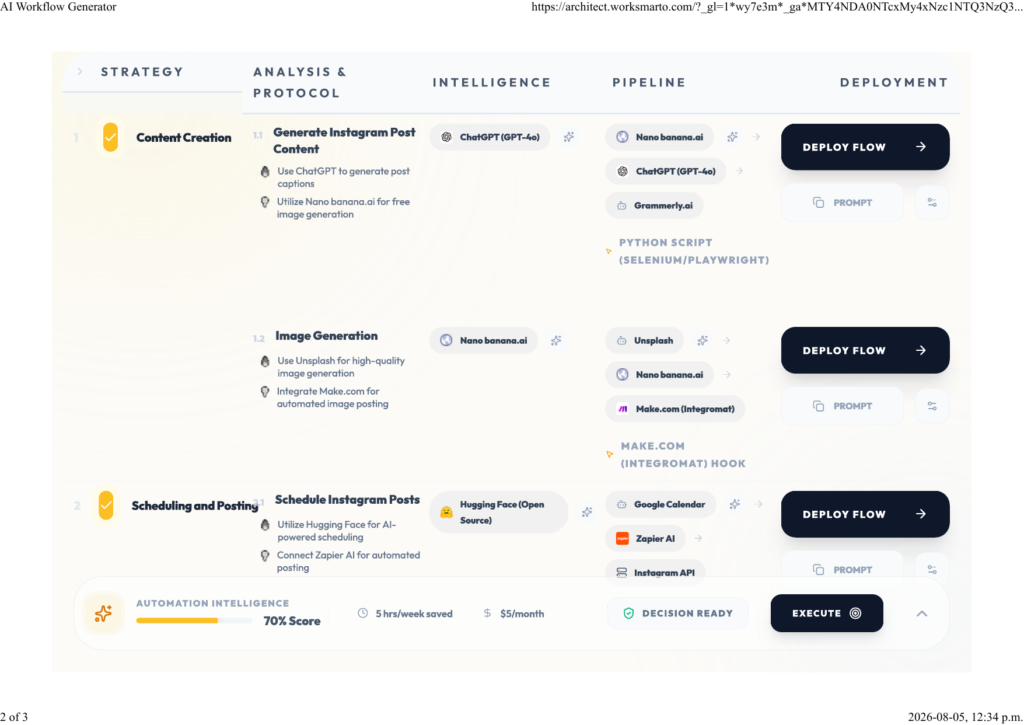
Step 1 — Content Creation. Captions via ChatGPT (GPT-4o), free image generation via Nano Banana.ai, backed by Grammarly.ai and a Python (Selenium/Playwright) script. Image generation pulls from Unsplash, Nano Banana.ai, and a Make.com (Integromat) hook for auto-posting.
Step 2 — Scheduling and Posting. Hugging Face (open source) schedules through Google Calendar, Zapier AI, and the Instagram API — Google Colab and GitHub Actions handle monitoring and automated reporting.
Every step has a Deploy Flow button and a Prompt button — push it live, or copy the prompt and run it yourself. Image generation alone shows three different tool combinations to pick from — nothing’s locked to one path.
Why It’s Free
It runs on the Groq API — fast, low-cost inference, which is what makes giving this away free actually sustainable. We don’t save or collect your data — as of now. And we’re actively tuning the prompts to get sharper results out of Groq over time.
Who’s Behind It
This is Software Innovation Labs — in practice, that’s a solo founder, working out of a co-working space, with freelance senior developers and AI tools making it possible. Ten years ago, this setup wasn’t a case you could make. Look at it now: there are platforms to hire senior-to-junior developers for compliance and audit checks, AI tools handle the actual development work, and a co-working space provides the rest of the infrastructure. This is the AI era — one solo founder, managing the whole system.
Look at what came out of that setup: a working SaaS product, live, free, and generating real automation plans right now.
Try it yourself: architect.worksmarto.com
What the workflow generator is actually solving
From AI Conversations to Actionable Workflows
The easiest way to misunderstand an AI workflow generator is to think of it as another chatbot.
It isn’t really about having a conversation with AI.
The useful part is what happens after the conversation.
A normal chatbot might answer:
“You can automate this process using an email trigger and a spreadsheet.”
That’s useful information.
A workflow generator should go one step further.
It should help turn that idea into something structured enough to build.
For example:
Goal: Capture new leads automatically.
Instead of leaving the user with a paragraph of advice, the workflow can be represented as:
New form submission
↓
Capture contact information
↓
Check whether the lead is new
↓
Add lead to database
↓
Send confirmation email
↓
Notify the founder
Now there is something concrete to work with.
That is the real difference between AI explaining automation and AI helping design automation.
From a vague idea to an actual workflow
Most people don’t start automation projects with a perfectly defined technical specification.
They start with a sentence.
Something like:
“I want new customers to automatically receive a welcome email.”
Or:
“Whenever somebody fills out my website form, I want the details saved somewhere.”
Or:
“I want to summarize new support messages every morning.”
These are goals, not workflows.
The difficult part is translating the goal into a sequence of actions.
That is where a workflow generator can become useful.
It can ask:
- What starts the workflow?
- What information is available?
- Where should that information go?
- Does anything need to be transformed?
- Should AI be involved?
- What happens if something fails?
- Does a human need to approve the result?
Those questions turn a vague idea into a system.
Trigger, action and condition
Most useful automations can be understood through three basic building blocks.
1. Trigger
Something happens.
Examples:
- A form is submitted.
- A new email arrives.
- A payment is received.
- A row is added to a spreadsheet.
- A customer places an order.
- A scheduled time is reached.
The trigger starts the workflow.
2. Action
Something happens because of the trigger.
Examples:
- Send an email.
- Create a database record.
- Add a task.
- Send a notification.
- Generate a document.
- Call an API.
3. Condition
The workflow decides what happens next.
For example:
New lead
↓
Is this an existing customer?
↓
YES ─────→ Existing-customer workflow
│
NO
↓
New-lead workflow
This simple structure is surprisingly powerful.
Once you understand triggers, actions and conditions, many complicated-looking automations become easier to break down.
Where AI fits into the workflow
Not every step needs artificial intelligence.
This is an important design principle.
If a workflow needs to move a name from one database field to another, AI probably isn’t necessary.
Traditional automation is faster, cheaper and more predictable.
AI becomes useful when the workflow has to interpret something.
For example:
“Read this customer message and determine whether it is a sales enquiry, technical question or complaint.”
That isn’t simply moving information.
The system has to understand the meaning of the message.
An AI model can help with that.
The workflow could therefore look like:
New customer message
↓
AI classifies the message
↓
┌──────┼─────────┐
↓ ↓ ↓
Sales Support Complaint
↓ ↓ ↓
CRM Ticket Human review
This is where AI-powered workflows become more interesting than traditional “if this, then that” automation.
Don’t use AI where ordinary automation is better
Adding AI to every workflow is one of the easiest ways to make an automation unnecessarily complicated.
Suppose I want:
“When somebody submits my contact form, send me an email.”
There is no reason to ask an AI model to make that happen.
The logic is deterministic.
Form submitted → send email.
Done.
Now suppose I want:
“Read the person’s message and determine what they are actually asking for.”
That is different.
The workflow contains an interpretation problem.
AI can potentially add value there.
A good rule is:
Use automation for predictable work. Use AI when interpretation is genuinely required.
That distinction can also help keep costs and failure rates under control.
What happens when the AI gets it wrong?
This is where a workflow generator needs to be more useful than a pretty diagram.
Every serious automation needs to consider failure.
Imagine the AI classifies a customer complaint as a sales enquiry.
The workflow could automatically send the wrong response.
That is worse than doing nothing.
So a better workflow might include a confidence threshold:
New message
↓
AI classification
↓
Confidence high?
↙ ↘
YES NO
↓ ↓
Automate Human review
The exact implementation will depend on the tools being used, but the principle is broadly useful.
Not every AI decision should be allowed to execute automatically.
Some decisions deserve human review.
Human-in-the-loop automation
This is one of the concepts I would encourage anyone experimenting with AI workflows to understand.
“Human in the loop” simply means that the automation can prepare or recommend an action, but a person approves it before something important happens.
For example:
New enquiry
↓
AI creates response draft
↓
Human reviews
↓
Approve?
↙ ↘
YES NO
↓ ↓
Send Edit
This can be especially useful for:
- customer communication,
- publishing content,
- financial operations,
- sensitive data,
- important business decisions,
- and anything where an incorrect automated action could cause significant problems.
Automation doesn’t have to mean removing humans.
Sometimes the best automation is the one that moves a human to the final decision instead of making them perform every previous step manually.
The workflow generator can also expose missing information
One of the underrated benefits of structured workflow generation is that it can reveal where a workflow is incomplete.
Suppose someone enters:
“I want to automatically follow up with new leads.”
That sounds straightforward.
But immediately, several questions appear.
How are leads collected?
Where are they stored?
How long should the system wait?
What happens if the person replies?
What if the person is already a customer?
How many follow-ups should be sent?
When should the sequence stop?
What happens if an email bounces?
What happens if the lead unsubscribes?
The generator can help surface these questions.
That’s useful even if the final workflow is built manually.
A workflow is more than a list of steps
A good automation should also describe the information moving through it.
Consider:
Website form
↓
Name
Email
Message
↓
Lead database
↓
AI classification
↓
Category
Priority
Summary
↓
Next action
The information changes as it moves through the workflow.
The original form contains raw information.
The AI produces structured information.
The database stores it.
Another system acts on it.
Understanding that data flow is essential when building more sophisticated automations.
What about APIs?
APIs are often the invisible layer connecting these systems.
An API allows one piece of software to communicate with another.
You don’t necessarily need to become an API expert to use a workflow generator.
But understanding the basic idea helps.
For example:
Website
↓
API
↓
CRM
or:
Automation
↓
AI API
↓
Classification
↓
Database
This is one reason APIs are so important to modern no-code and low-code automation.
They allow different services to work together without requiring every application to be built by the same company.
No-code does not mean no thinking
The phrase “no-code” can sometimes create the wrong impression.
No-code tools remove or reduce the need to write traditional code.
They don’t remove the need to understand the process.
You still need to know:
- what should trigger the workflow,
- what information is required,
- what should happen next,
- what conditions matter,
- what can go wrong,
- and what the desired final result is.
In fact, understanding the business process may become more important than knowing how to write every line of code.
That’s one reason I find AI workflow generation interesting.
It can potentially help translate business logic into technical structure.
A simple example for a solo founder
Let’s imagine a solo founder publishes a new article.
They want several things to happen automatically.
The workflow could be:
Article published
↓
Create social-media draft
↓
Generate short summary
↓
Add article to content database
↓
Create follow-up task
↓
Notify founder
Notice something important.
The AI doesn’t necessarily publish everything automatically.
It could create drafts.
The founder reviews them.
Then the appropriate platform is used for publishing.
This is a much safer workflow than:
Article published
↓
AI generates everything
↓
AI publishes everything
The second workflow might be faster.
The first workflow provides more control.
For many small businesses, that trade-off is worthwhile.
Another example: customer support
Here’s another practical workflow.
Customer email arrives
↓
Extract message
↓
AI identifies topic
↓
Search approved information
↓
Draft response
↓
Confidence check
↓
Human review if necessary
↓
Send response
This type of workflow can reduce repetitive work without pretending that an AI system should have unlimited authority.
The important part is the approved information source.
If the AI is answering customers, it shouldn’t simply invent an answer because it doesn’t know one.
The workflow should make uncertainty visible.
Where workflow generators can go wrong
No tool should be treated as infallible.
A generated workflow can fail for several reasons.
The input is too vague
“Automate my marketing” isn’t a sufficiently specific requirement.
The wrong tool is selected
A workflow may be technically possible but unnecessarily expensive or complicated.
A dependency isn’t available
The chosen application may not have the required API or integration.
The workflow ignores exceptions
Real-world processes rarely behave perfectly every time.
Permissions are overlooked
The workflow may require access to sensitive information.
The AI makes an incorrect assumption
This is particularly important for AI-powered steps.
The workflow becomes too complicated
A ten-step automation isn’t automatically better than a three-step one.
The best workflow is usually the simplest workflow that reliably achieves the goal.
The hidden cost of automation
There is another thing worth considering before building an elaborate workflow.
Automation has a maintenance cost.
A workflow might work perfectly today.
Then:
- an API changes,
- an integration breaks,
- a platform changes its pricing,
- a field is renamed,
- authentication expires,
- a service becomes unavailable,
- or the business process itself changes.
Suddenly the automation needs attention.
This is why I don’t think the goal should be:
“Automate everything.”
The better goal is:
“Automate the right things.”
A small workflow that saves repetitive effort and rarely needs maintenance can be much more valuable than an impressive automation that constantly breaks.
How I would evaluate a generated workflow
Before implementing any workflow, I would run through five questions.
1. Is the trigger clear?
Can I identify exactly what starts the workflow?
2. Is the outcome measurable?
What should happen when the workflow finishes?
3. Can every step actually be implemented?
Does the required integration or API exist?
4. What happens when something fails?
Is there an error path?
5. Where should a human review the result?
Not every workflow needs human approval, but important decisions often do.
If a generated workflow can answer those questions clearly, it is much closer to something that can actually be built.
From workflow generation to workflow building
This distinction is important.
A workflow generator doesn’t automatically mean a production-ready automation.
Think of the generated workflow as a blueprint.
The blueprint tells me:
- what should happen,
- in what order,
- what information moves between steps,
- where AI might be useful,
- and where decisions need to be made.
The actual implementation still depends on the tools available.
That could mean using:
- a no-code automation platform,
- APIs,
- webhooks,
- a database,
- a CRM,
- WordPress,
- custom code,
- or a combination of several systems.
The generator helps with the thinking.
The implementation turns the thinking into a working system.
Why this matters for a solo founder
For a large company, designing a workflow can involve several people.
There may be:
- operations teams,
- developers,
- IT administrators,
- automation specialists,
- product managers,
- and business analysts.
A solo founder doesn’t have that luxury.
The founder often has to play all of those roles to some degree.
That is why tools that help translate an idea into a technical workflow can be valuable.
They don’t replace the founder.
They help reduce the distance between:
“I know what I want to happen.”
and
“I know how I could build it.”
That gap is where a lot of small projects get stuck.
The workflow itself becomes an asset
Once a useful workflow exists, it isn’t merely a one-time automation.
It can become part of the business infrastructure.
A lead-processing workflow can run every day.
A content workflow can support every article.
A support workflow can handle recurring questions.
A reporting workflow can prepare information regularly.
A product workflow can coordinate multiple systems.
The workflow becomes a reusable process.
And that is where automation starts producing compounding value.
But don’t automate a broken process
This may be the most important rule of all.
If the existing process is confusing, automation can simply make the confusion happen faster.
Before automating something, ask:
“Would this process make sense if I had to explain it to another person?”
If the answer is no, simplify the process first.
Then automate it.
AI can help identify unnecessary steps, but the business owner still needs to understand why the process exists.
A useful mental model
I think there are four stages:
Stage 1 — Manual
You do everything yourself.
Stage 2 — Assisted
AI or software helps with individual steps.
Stage 3 — Automated
Multiple steps happen automatically.
Stage 4 — Adaptive
The system can interpret changing inputs and choose between different paths.
Most businesses don’t need to jump directly to Stage 4.
Stages 1 and 2 are often enough to discover what actually deserves automation.
That is another reason a workflow generator can be useful.
It can help you design before you over-engineer.
What the “AI” part should actually mean
I wouldn’t define an AI workflow as:
“A workflow containing an AI model.”
That’s too broad.
A better definition is:
A workflow where AI performs a task that benefits from interpretation, generation, classification, summarization or reasoning.
That makes the technology purposeful.
If an ordinary rule can solve the problem, use the rule.
If the workflow needs language understanding or flexible interpretation, AI may be appropriate.
This approach also makes workflows easier to understand and maintain.
The bigger idea behind the generator
The most interesting possibility isn’t that AI can draw a workflow diagram.
It’s that AI can become a translator between human intention and software systems.
Humans naturally think in outcomes.
Software usually requires precise instructions.
We say:
“I want every new customer to get a personalized welcome.”
A machine needs something closer to:
WHEN customer_created = true
THEN retrieve customer profile
THEN generate approved message
THEN send email
THEN log communication
AI can potentially help bridge that gap.
That’s why workflow generation matters.
It isn’t really about diagrams.
It is about translation.
The human still owns the outcome
Even if AI generates the workflow, the person building the system remains responsible for understanding what it will do.
That means checking:
- permissions,
- data sources,
- integrations,
- AI instructions,
- error handling,
- privacy,
- costs,
- and the final output.
A generated workflow should therefore be treated like generated code:
Useful starting point. Not automatic approval.
Where I see the biggest opportunity
For solo founders, freelancers and small teams, I think the most useful AI workflows will often be surprisingly ordinary.
Not science-fiction systems.
Not completely autonomous companies.
Just small pieces of repetitive work that currently consume attention.
A lead gets organized automatically.
A customer question gets classified.
A report gets prepared.
A document gets summarized.
A task gets created.
A notification gets sent.
A draft gets prepared for review.
One workflow might save only a small amount of effort.
But several well-designed workflows can change how a small business operates.
That is the part worth paying attention to.
Wrapping up
The phrase “AI workflow generator” can sound much more complicated than it needs to be.
At its simplest, it is a way of taking a human goal and turning it into a structured sequence of actions.
The value isn’t in generating the most elaborate workflow.
It is in generating one that makes sense.
One that can actually be built.
One that uses AI only where AI adds value.
One that has sensible error handling.
One that doesn’t require unnecessary subscriptions.
And one that keeps a human involved when the consequences of a mistake are important.
That’s the approach I would take with any AI workflow.
Start with the problem.
Describe the desired outcome.
Break it into steps.
Identify the repetitive parts.
Use ordinary automation where possible.
Add AI where interpretation is genuinely useful.
Test everything.
And only then decide what should run automatically.
The future of automation doesn’t have to mean handing an AI system control of an entire business.
For a solo founder, something much simpler may be more valuable:
a collection of small, reliable workflows that quietly take repetitive work off the founder’s plate.
That’s where AI workflow generation becomes practical.
Not because AI does everything.
But because it can help one person turn an idea into a system.